Rockbot - Request Music
- 4.2
- Rating
- 500.00K
- Installs
- Free
- Price

 Analysis by App-foxy
I usually judge a music app by what happens after the first tap: can it help me choose something quickly, keep the listening experience enjoyable, and fit naturally into an ordinary day? Rockbot - Request Music takes a different route from a typical personal streaming service. It is a free Music & Audio app from Rockbot, Inc. built around choosing music in a shared listening environment, where requests and selections can influence what plays next. That makes it especially interesting for social spaces, casual gatherings, and anyone who enjoys having a say without taking over the entire playlist.
After spending time with it, my impression is that this is less of a private music library and more of a participation tool. The appeal is not simply pressing play on a familiar track. It is the small creative process around deciding what belongs in the moment, seeing whether a request fits the atmosphere, and accepting that the final result is shared rather than completely controlled. Rockbot works best when music is part of a room, not just a pair of headphones.
Starting with a shared musical idea
The first thing I noticed is that the app asks me to think about context. With a conventional streaming service, I can start from an artist, album, mood, or carefully built personal playlist. Here, the starting point is more social: I am choosing music that I want to hear while other people are also participating. That changes how I make a request. A song can be a personal favorite, but it also needs to make sense for the setting and the people around me.
You May Also Like

 Blood Strike: 2.5 Anniversary
Blood Strike’s Loadouts Turn Every Drop Into a Tactical Gamble
A close look at Blood Strike’s custom loadouts: how fast access to signature weapons reshapes its battle royale rhythm, rewards preparation, and narrows the gap between fights.

 Pandora - Music & Podcasts
Pandora’s Music Is Easy to Start, but Harder to Recover
Pandora’s strength is its low-effort path from a seed to a station. Its weak spot is how much confidence it asks you to place in connection, setup, and quiet recovery.

 8 Ball Pool
 Is Built on Rivalries, Rematches, and Routine
A close look at the rivalries, rematches, shared routines, and unanswered safety questions that turn a quick pool match into a persistent mobile community.

 Samsung Music
’s Quiet Strength Is Playing What You Already Own
Its reach comes less from spectacle than from dependable access to a personal library. That simplicity is both the app’s strongest retention engine and its ceiling.

 AccuWeather: Weather Radar
AccuWeather Review: A Quick, Clear Forecast for Everyday Decisions
For everyday plans, the best forecast is the one you can understand quickly. AccuWeather makes rain timing, radar, and local conditions easy to act on, with a few trade-offs.

 Hill Climb Racing
Why Hill Climb Racing Still Turns Crashes Into One More Run
A tiny car, a bumpy hill and one more upgrade: Hill Climb Racing keeps resurfacing because its simple chaos makes every near-miss feel personal.
More From Our News Desk
View All News


This makes the app useful in situations where nobody wants one person to become the permanent DJ. At a casual workplace gathering, a shared hangout, or a public venue using the Rockbot system, people can contribute ideas instead of arguing over a single phone. I like that the app turns music selection into a lightweight group activity. It gives quieter listeners a way to participate without needing to manage the entire queue.
There is also a useful distinction between requesting a song and expecting instant control. The experience is more collaborative than a private player, so I approach it with a little patience. If I want an exact sequence, uninterrupted album listening, or complete control over playback, a normal streaming app is usually a better fit. If I want to add a voice to a shared atmosphere, Rockbot makes more sense.
The app’s store summary, “Play Music You Love, Anywhere,” sounds broad, but my practical interpretation is narrower and more helpful: it is for bringing your taste into participating listening situations. That is an important expectation to set before installing it. The app is not automatically a replacement for every music service on a phone. Its value depends on whether the environment around me supports the kind of shared interaction it is designed for.
Finding the right song for the moment
My best results came from treating requests as mood choices rather than isolated favorites. Before selecting something, I considered whether the room felt relaxed, energetic, nostalgic, or ready for a change. That small pause improved my choices more than simply searching for the first artist that came to mind. It also made the app feel closer to creative direction: I was helping shape an atmosphere, not merely filling silence.
A practical tip is to keep a few different kinds of requests in mind. I might choose a dependable crowd-pleaser when the room needs energy, something familiar when conversation is already lively, or a less obvious track when the current flow feels repetitive. This approach is more effective than repeatedly requesting songs from one narrow corner of my taste, especially when several people are contributing.
Another non-obvious strength is that the app encourages me to listen to the room before I act. In a personal playlist, I can skip freely and nobody else is affected. In a shared setting, every request has social weight. That makes Rockbot surprisingly useful for learning how music works as part of an environment. It rewards awareness and timing more than obsessive control.
Making the listening experience work
Using the app feels like a small production workflow. I begin with an idea, turn that idea into a request, and then watch how it fits into the shared listening experience. The “making” stage is not editing an audio file or composing a track; it is constructing a better moment through selection. That distinction matters because someone looking for recording, mixing, beat-making, or music publishing tools will not find the right kind of workspace here.
For me, the process is most enjoyable when I avoid over-managing it. I choose a song, let the shared system do its part, and pay attention to the result. This is different from building a private playlist where I can arrange every transition in advance. Rockbot’s creative limitation is also its identity: I contribute to a larger flow rather than producing a finished sequence alone.
That shared approach can reduce friction at gatherings. Instead of passing one phone around, explaining a playlist, or asking someone to search for every suggestion, participants can use their own devices to contribute. It creates a clearer handoff between the person with the idea and the system handling the communal playback. In my experience, that is where the app feels most purposeful.
Still, the workflow depends on cooperation. If the surrounding venue or group is not using the compatible Rockbot experience, the app cannot magically turn any speaker into a shared request station. This is one of the biggest practical limitations. Before relying on it for an event, I would first check that the place supports Rockbot and that the intended listening setup is active. That simple check prevents a disappointing installation followed by no useful way to participate.
Why it feels different from ordinary streaming
Most familiar streaming apps are optimized for individual discovery and personal control. They remember what I like, offer playlists for my habits, and let me decide what plays next. Rockbot is better understood as a bridge between a listener and a shared music system. The central question is not “What do I want to hear for the next hour?” but “What would I like to add to this shared moment?”
That difference gives it a clear advantage in social environments. I do not need to create a complete playlist before people arrive, and I do not need to hand over control to one person. Requests can make the music feel more representative of the group. The trade-off is that I give up the predictability and privacy of a personal service.
It is also less suitable for focused listening. When I am commuting alone, working through an album, or trying to hear a specific sequence without interruption, I prefer a standard streaming player. Rockbot becomes more compelling when the music is part of a larger activity and the ability to contribute matters more than personal precision.
The developer, Rockbot, Inc., has positioned the app in a space that is easy to understand once I stop comparing it directly with private streaming catalogs. Its identity comes from participation. That is why I would recommend it alongside another music app rather than assuming it must replace one. Each serves a different listening job.
Iteration: adjusting without taking over
The most interesting part of the experience is the feedback loop. I make a request, observe the atmosphere, and decide whether my next contribution should reinforce the current direction or gently change it. This is a simple form of iteration, but it feels meaningful because the result is visible in the room. If people become more engaged, the choice worked. If the mood moves elsewhere, I can adapt rather than insisting on my original plan.
This is where I found one of the app’s strongest everyday use cases. Imagine a small gathering where the first few songs are too slow for the conversation that has developed. Instead of replacing the entire playlist, I can request something with more movement and see whether the room responds. Later, if the energy becomes too intense for conversation, another carefully chosen request can help bring it back down. The app supports gradual adjustment rather than a dramatic change of control.
I also learned not to treat every request as a competition. If several people are participating, my preferred song may not appear immediately or may not define the direction of the session. That can feel less satisfying than a private queue, but it is part of the shared design. The right mindset is contribution, not ownership.
A useful habit is to vary the distance between requests. Requesting repeatedly can make the experience feel like I am trying to dominate the room, while making one thoughtful contribution and waiting gives the system and other listeners space. This is not a technical feature; it is a practical way to get more value from the app’s social structure.
Where the friction appears
The main friction is the reduced sense of certainty. I cannot approach the experience with the same expectations I have for a personal playlist. The result depends on the shared setting, the available listening environment, and the choices of other participants. Anyone who dislikes waiting, group decisions, or unexpected changes may find the app frustrating.
There is also a mental adjustment when a favorite song is not the best choice for the moment. I may love a track but decide that it would interrupt the current mood. That can make the app feel less immediately gratifying, yet it is also what gives the experience some depth. It asks me to separate “music I personally enjoy” from “music that helps this particular room work.”
Another limitation is that the app’s usefulness is situational. I would not install it expecting a complete personal music-management system, a creative audio editor, or a publishing tool. It does not replace software for making tracks, trimming recordings, arranging stems, or delivering finished audio. Its creative output is the shared atmosphere created through requests, not an exported music project.
That boundary is important for creators. If I am a musician looking to prepare a demo or send a final mix to a client, I need a dedicated production and file-sharing workflow. If I am organizing the soundtrack of a live social setting and want multiple people to contribute, Rockbot is much more relevant. The app succeeds when the creative task is selection in context.
Handoff, sharing, and everyday use
Rockbot’s handoff is social rather than file-based. I am not exporting a finished playlist or sending an edited audio package to another person. Instead, I pass an idea into a shared playback environment and let that environment carry it forward. For a venue or gathering, this can be more natural than preparing a file in advance because the music can respond to the people present.
That workflow is especially convenient when the group’s preferences are mixed. A prebuilt playlist reflects the person who made it, while a shared request process can collect several perspectives. I would use it when I want guests, coworkers, or friends to feel that they have some ownership of the soundtrack. I would avoid it when the event requires a precise musical schedule, such as carefully timed cues or uninterrupted background programming.
One practical scenario is a relaxed evening where people arrive at different times. Early on, I might request something unobtrusive while conversation develops. As more people join, I can choose a familiar track that gives the room a common point of reference. If the group starts discussing music, requests become part of the conversation itself. The app has then moved beyond playback and become a simple social prompt.
For a person wondering whether it is suitable for children or mixed-age use, the listed content rating is Everyone, which makes its general positioning approachable for a broad audience. I would still make choices based on the specific venue and group, because an age rating does not decide whether every individual song suits every occasion. The responsibility remains with the people shaping the shared listening experience.
The app is free, which lowers the barrier to trying it. That is helpful when I am testing whether a group actually enjoys request-based music rather than committing money before understanding the format. I would still think of the free installation as an invitation to explore the workflow, not a guarantee that it will fit every listening habit.
Device expectations and keeping the experience practical
The current version is 3.10.3, and the app supports devices running Android 5.0 or later. That gives it a fairly accessible technical starting point for people using older compatible Android phones, although the quality of the overall experience still depends on the active Rockbot setup around me. The phone is only one part of the chain; the shared playback environment is equally important.
When I use it, I prefer to keep the phone available for checking the request flow without constantly staring at the screen. The app works better as a background participant than as something that demands continuous attention. I can make a choice, return to the conversation, and let the music become part of the setting. That is a better fit than expecting a deep browsing session like the one I might have with a personal streaming catalog.
The app has attracted over half a million installs, with an average rating of 4.2 from roughly twelve thousand ratings and about four thousand three hundred written reviews. Those figures suggest that the idea has found a real audience, but they do not change the central question I would ask before downloading: do I regularly spend time in places where shared requests are useful? If the answer is yes, the installation has a clear purpose. If not, the app may remain unused even if I like the concept.
I also appreciate that the product is easy to explain to a friend in one sentence: it lets people participate in music playing in a shared setting. That clarity matters. Apps with a narrow but understandable job are often more satisfying than tools that promise to cover every part of music consumption. Rockbot is not trying to be my studio, library, radio, and playlist archive at once.
Who should use it and who should skip it
I would recommend Rockbot to people who enjoy communal listening, want a low-pressure way to influence the music in a venue, or are tired of one person controlling every song at a gathering. It is also a good match for someone who likes thinking about how a track changes the mood of a room. The app gives that instinct a practical outlet.
I would be more cautious about recommending it to a listener who mainly wants offline personal listening, detailed library organization, album-focused playback, or total control over the next song. A conventional streaming service will be more efficient for those needs. Likewise, musicians searching for recording, editing, publishing, or client-delivery features should choose a dedicated creative tool. Rockbot does not turn a phone into an audio workstation.
The app is also not ideal for someone who expects every request to be accepted instantly or who dislikes shared decision-making. Its best quality—participation—creates its biggest trade-off. I gain a voice, but I do not gain absolute authority. Once I accept that exchange, the experience becomes much more enjoyable.
My advice is to install it when I have a specific social use in mind rather than downloading it as a general-purpose music replacement. Try it in a compatible shared environment, make one or two thoughtful requests, and notice whether the group enjoys the interaction. That test tells me more than browsing the app in isolation.
My creator-minded verdict
Rockbot - Request Music is a focused Music & Audio app that treats song selection as a shared creative act. I like it because it gives ordinary listeners a role in shaping an atmosphere without requiring them to become full-time DJs. The strongest moments come from choosing with context, waiting for the room to respond, and adjusting gently rather than trying to control everything.
Its limitations are equally clear. The experience is dependent on the right shared setting, less predictable than private streaming, and not designed for producing or delivering original audio. Those are not minor details; they define who should use it. Someone looking for a personal music library should probably stay with a traditional streaming alternative, while someone looking for communal participation has a genuine reason to try this one.
Released on February 10, 2011, and still available as a free app for Everyone, it has had time to establish a recognizable purpose. In my view, the 4.2 average rating and broad installation base reflect a concept that works when matched with the right situation, rather than a universal replacement for every music app. My recommendation is simple: choose Rockbot when you want to add your taste to a room, not when you want the room to disappear.
FAQs for Rockbot - Request Music
01What is Rockbot - Request Music and how does it work?
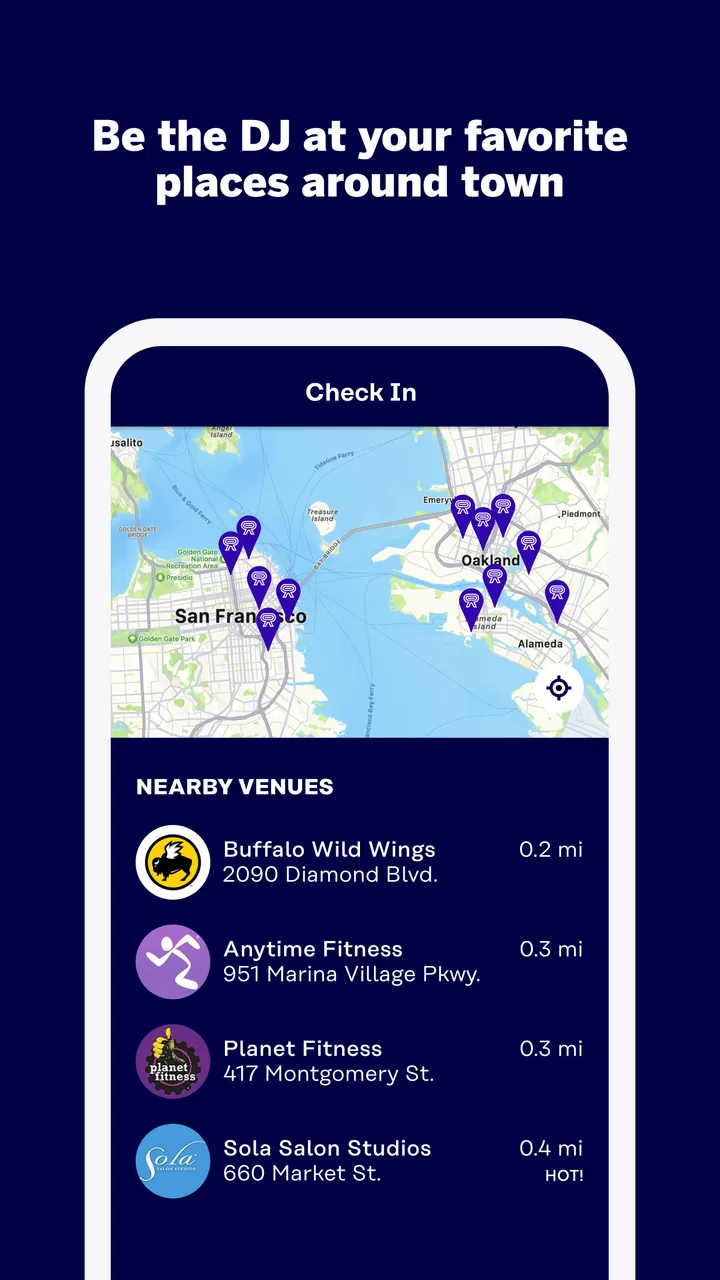
Rockbot - Request Music is an interactive music and entertainment platform used in participating bars, restaurants, gyms, hotels, and other public venues. After opening the app, you can check the location’s available music library, browse artists or songs, and submit requests. Depending on the venue’s settings, your selection may be added to a queue, require credits, or be subject to approval by staff.
02Can I use Rockbot - Request Music anywhere, or only at supported venues?
The app is designed primarily for use at venues that have Rockbot installed and enabled. It is not a general music player that lets you control music in any location. Before downloading or creating a request, check whether the venue you are visiting appears in the app and supports guest interaction. Availability, music choices, and request rules can vary considerably from one location to another.
03Do I have to pay to request songs on Rockbot?
Rockbot can be downloaded and used to browse participating venues, but requesting music may involve additional costs depending on the location. Some venues allow free requests, while others use credits, paid requests, or special rules established by the business. The app normally displays the applicable requirement before you submit a selection, so review the final screen carefully to avoid unexpected charges.
04Why was my song request not played immediately, or not played at all?
A request is not always guaranteed to play instantly. Venues may use queues, voting systems, content filters, time restrictions, or staff approval before a song reaches the speakers. Popular locations can also have many requests waiting ahead of yours. A venue may skip a selection because of explicit lyrics, duplicate requests, unavailable licensing, or a decision made by its employees.
05Does Rockbot - Request Music collect my personal information and location data?
To provide venue-based features, Rockbot may request information such as your account details, device data, approximate location, and activity related to music requests. Location access can help identify nearby participating venues, although availability depends on your device permissions and settings. Before using the service, review the app’s current privacy policy and permission prompts, and disable access you do not consider necessary.
Pros
- Lets users request songs directly from participating venues.
- Helps discover what is playing at nearby Rockbot locations.
- Supports venue-specific music choices and interactive experiences.
- Can make waiting at bars
- gyms
- and businesses more entertaining.
- Simple concept that is easy to understand and use.
Cons
- Only works at venues that have partnered with Rockbot.
- Song requests may be skipped or rejected by venue settings.
- Some features depend on your location and venue availability.
- The music catalog and controls can vary between participating locations.
- Requests may require credits
- payment
- or waiting in a queue.

Rockbot - Request Music
Gallery